26 Big Data Brushes Part 1: Tech-Specific Vector Assets
Understanding the "Big Data" Aesthetic
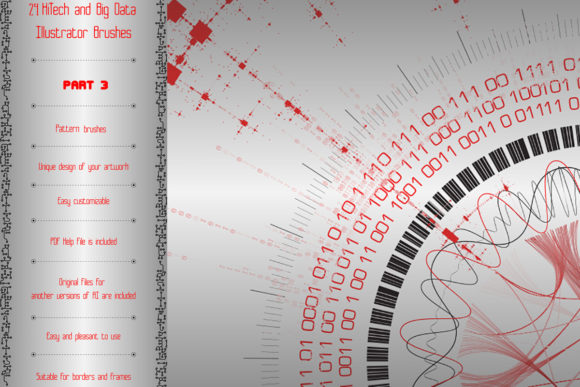
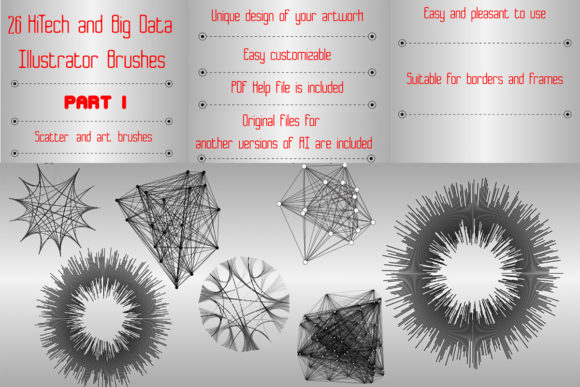
In the current landscape of modern typography and design, the visual language of technology is distinct. It is rarely about traditional letterforms or serif font elegance. Instead, it revolves around patterns, circuits, and the visualization of information. This is where 26 Big Data Brushes Part 1 enters the conversation. It is not a premium font in the traditional sense, but rather a specialized set of design assets tailored for the Adobe Illustrator environment. These brushes are designed to mimic the complexity of data streams, radio circuits, and matrices.
The core appeal of this bundle lies in its ability to generate futuristic imagery with minimal effort. The pack includes 19 art vector brushes and 7 scatter vector brushes. When applied to a path, these brushes transform simple lines into intricate chains of data visualization elements. You can create futuristic mandalas and frames, endless ribbons, and complex edging that look like they belong on a sci-fi movie interface. The personality is distinctly digital—cool, calculated, and precise.
Strategic Applications for Brand Identity and Marketing
For small business owners and marketers in the tech sector, visual consistency is vital. Using these brushes allows you to build a brand identity that speaks the language of innovation. If you are designing a logo for a cybersecurity firm or a SaaS platform, a standard sans serif font might feel too plain on its own. By incorporating these vector brushes as decorative elements around the typography, you instantly signal that the brand is technical and forward-thinking.
Consider the versatility in packaging design and social media graphics. A content creator focusing on tech reviews or digital education can use the scatter brushes to create unique borders for Instagram stories or YouTube thumbnails. The ability to change the color, size, or thickness of the brushes means they can adapt to different campaign needs without losing their core visual style. They function effectively as a creative font alternative for decorative headers where a standard display font might be too static.
Technical Flexibility and Web Design Integration
One of the practical strengths of the 26 Big Data Brushes Part 1 bundle is its compatibility. It is optimized for Illustrator CS5 and above, ensuring that even if you are working with legacy software, you can still access these design assets. For web design projects, these vectors are invaluable. Unlike raster images, vector brushes scale infinitely without losing quality. This is crucial for responsive design, where assets must look sharp on both mobile screens and 4K monitors.
The brushes include waves, clusters, and radial diagrams. This variety allows for complex compositions. You can layer a "radio circuit" art brush over a "matrix" scatter brush to create depth. This layering technique is a staple in editorial design, particularly for magazine covers or book jackets dealing with cyberpunk or future-noir themes. The visual hierarchy becomes dynamic; the eye is drawn to the complexity of the data streams framing the central message.
Practical Workflow and Font Pairing Tips
While these assets are not a typeface, they demand the same consideration for balance as choosing a script font or handwritten font. Because the visual density of the brushes is high, they pair best with clean, legible typography. A bold, geometric sans serif font is an ideal companion. The simplicity of the text ensures readability against the intricate background of data visualization elements.
Here is a practical workflow for integrating these brushes into your projects:
- Selection: Open the included Ai or EPS files. The brushes are organized clearly.
- Application: Draw a simple path with the Pen tool. Select a brush from the panel to apply the data effect.
- Customization: Expand the appearance if you need to edit specific nodes, or simply adjust the stroke weight to change the density of the "data."
- Color Grading: These assets look best in monochromatic schemes or neon palettes against dark backgrounds to emulate glowing screens.
For hobbyists and crafters, these brushes offer a way to create high-tech looking invitations or party decorations for a cyber-themed event. The included PDF help file provides screenshots, which is helpful for visual learners who want to see exactly how the brushes interact with different stroke settings.
Evaluating the Asset for Commercial Font Projects
When working on logo design or high-stakes commercial font projects, the scalability of your assets is non-negotiable. The 26 Big Data Brushes Part 1 are designed to be malleable. You are not locked into a single look. By combining several brushes, you can achieve results that look entirely custom. This is a significant advantage over static stock images. You are essentially using a tool to generate infinite variations of a design element.
However, it is important to test the brushes in the context of your specific project. A design that looks great on a poster might become too "noisy" on a business card. The "big data" aesthetic is inherently detailed. In smaller formats, consider using the brushes sparingly—perhaps as a subtle accent line rather than a full border. This ensures that the design remains professional and legible, adhering to the principles of good modern typography.
Ultimately, this bundle serves a specific niche. It is not a universal solution for every design problem, but for those requiring a technological or scientific visual language, it provides a robust toolkit. It bridges the gap between static illustration and dynamic pattern generation, making it a valuable addition to any designer's library of design assets