Mastering Clean Outlines with Procreate Brushes
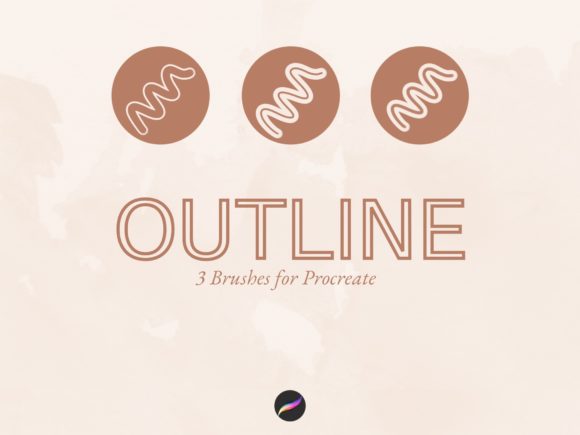
In the fast-paced world of digital illustration, efficiency often separates a good design from a great one. If you have ever struggled to create perfectly crisp borders around your lettering or illustrations, you know how time-consuming manual tracing can be. This is where a specialized toolset becomes invaluable. The Outline Brushes for Procreate offer a streamlined solution for artists and designers who want to achieve professional results without the tedious workflow. These brushes are designed to create a hollow or unfilled stroke instantly, allowing you to drop color into the center with a simple gesture.
Visual Characteristics and Style
At first glance, the aesthetic appeal of these tools lies in their precision. Unlike standard brushes that require you to draw a shape and then manually select the "fill" tool, these assets combine the two processes. The visual characteristic of the stroke is a clean, vector-like edge that mimics the look of high-end display font families or stencil art. The personality of this style is bold, graphic, and contemporary. It leans heavily into modern typography trends where negative space and color blocking are used to create visual impact. Whether you are working on a handwritten font style script or a rigid geometric shape, the brush maintains a consistent weight and opacity, ensuring that your brand identity assets look cohesive.
Practical Applications for Creators
The versatility of these brushes extends far beyond simple doodling. For the modern content creator or entrepreneur, these assets are a powerhouse for social media graphics. Imagine creating Instagram stories where text needs to pop against a busy photo; the outline effect allows the background to be seen through the letters, creating a layered, professional look that stops the scroll. This technique is particularly effective for packaging design mockups, where you might want to simulate a foil stamp or a die-cut effect on a label.
Furthermore, for those involved in editorial design or web design, the drag-and-drop color feature is a massive time saver. It allows for rapid experimentation with different color palettes. You can test how a specific hue looks inside the outline without destructively editing your canvas. This non-destructive workflow is essential for brand strategists who need to present multiple options to clients. The brushes also function beautifully for photo editing, specifically for creating custom overlays or watermarks that don't completely obscure the underlying image. It is a premium font style effect achieved through a simple brush tool.
Influence on Visual Hierarchy and Brand Perception
How you treat your text dictates how your audience perceives your message. Using Outline Brushes for Procreate allows you to manipulate visual hierarchy effectively. By using a bold outline for a headline and a thinner weight for subheadings, you create an immediate distinction between primary and secondary information. This is a fundamental principle of modern typography. It guides the viewer’s eye naturally down the page.
In terms of brand perception, the clean, unfinished look of an outline conveys a sense of modernity, openness, and creativity. It feels less rigid than a solid block of text. For a small business owner or a blogger, utilizing this style in your logo design or digital assets suggests that you are up-to-date with current design trends. It adds a layer of sophistication to creative projects that standard system fonts simply cannot provide. The ability to fill the inside with brand-specific colors ensures consistency across all your marketing materials.
Integration and Workflow Optimization
One of the standout features of this particular download is its simplicity. The file comes as a single .brushset file, which means installation is seamless. You simply tap the file on your iPad, and it integrates directly into your Procreate library. This plug-and-play nature is vital for professionals who cannot afford to spend hours configuring settings. The Outline Brushes for Procreate are optimized to work with the app’s native color drop feature. This synergy between the tool and the software ensures that your workflow remains fluid. You are not fighting the technology; you are collaborating with it.
For crafters and hobbyists, this ease of use opens up new possibilities for personal projects. Whether you are designing a custom t-shirt, a greeting card, or a digital planner cover, the ability to create intricate outlined designs quickly makes the creative process more enjoyable. Even marketers with limited design experience can produce social media graphics that look like they were made by a seasoned graphic designer. The brushes bridge the gap between amateur sketching and professional digital art.
Evaluating Project Fit and Commercial Use
When deciding if these design assets fit your current project, consider the medium. Because these are raster-based brushes, they are perfect for digital use, such as iPad wallpapers, website headers, and social posts. However, for large-scale print projects like billboards, you will need to ensure your canvas resolution is high enough to maintain the crispness of the outline.
It is also important to note the licensing. These brushes are provided for your creative use, but like most premium font and asset packs, they cannot be resold or redistributed. This protects the integrity of the tool and ensures that your work remains unique. When testing font pairing—or in this case, pairing these brush strokes with standard text—look for high contrast. A clean sans serif font pairs exceptionally well with the organic, hand-drawn nature of the outline strokes. This contrast creates a dynamic tension that makes the design more engaging.
Ultimately, the Outline Brushes for Procreate are more than just a set of tools; they are a workflow enhancer. They allow you to produce high-quality, trend-forward digital art and brand identity materials with speed and precision. Whether you are a professional designer looking to speed up your lettering process or a publisher seeking fresh visual styles for your next cover, these brushes provide a practical, stylish solution.