Spring Blooming Stamp Brushes for Procreate
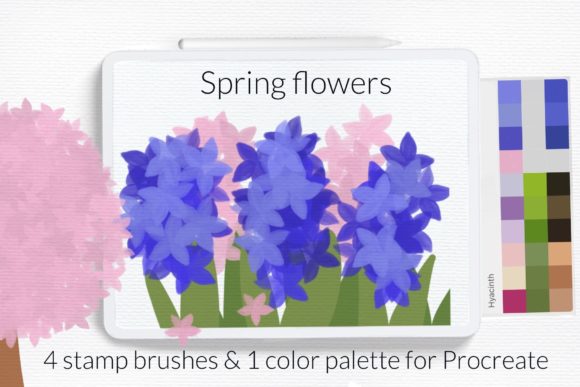
There’s a specific energy that arrives with spring, and for digital artists, capturing that fleeting beauty of cherry blossoms or lilac bushes can be challenging with standard brushes. The Blooming Spring Flowers Procreate Brush set is designed to bridge that gap between technical execution and artistic inspiration. This isn't just a random collection of textures; it is a curated toolkit featuring four distinct stamp brushes and a cohesive color palette. You get everything from delicate sakura petals to the full-bodied structure of apple and peach blossoms. It allows you to bypass the hours spent on rendering individual petals and jump straight into the composition.
The Anatomy of the Collection
What makes this particular set stand out in a crowded market of digital assets is the attention to organic detail. When you look closely at the visual characteristics of these stamps, you’ll notice they aren't flat or overly symmetrical. The personality of the Blooming Spring Flowers Procreate Brush lies in its natural imperfection—mimicking the way light hits a hyacinth or the density of a blooming tree branch.
The collection includes four specific stamps: the hyacinth, the lilac, and two variations of blooming trees (sakura, apple, and peach). This variety is crucial for creating depth. A single flower type can make a digital illustration look repetitive, but mixing these different styles allows for complex, layered compositions. Furthermore, the included color palette is not an afterthought. It has been sampled from actual spring flora, ensuring that your digital illustration on iPad feels grounded in reality rather than looking like an artificial simulation.
Practical Applications for Creators and Brands
As a designer or brand strategist, you know that visual assets need to do more than just look pretty; they need to communicate a message. The utility of the Blooming Spring Flowers Procreate Brush extends far beyond simple illustration.
For packaging design and brand identity, these brushes offer a way to instantly evoke feelings of freshness, growth, and renewal. Imagine a skincare brand launching a spring line; using these stamps to create background textures or border elements on product labels can immediately signal the seasonal nature of the product without needing to hire a botanical illustrator for a bespoke painting.
In the realm of social media graphics and marketing, speed is often of the essence. Content creators and bloggers can use these stamps to produce high-quality Instagram stories, Pinterest pins, or blog headers in a fraction of the time it would take to draw by hand. Because the stamps are pre-rendered with realistic lighting, they add a level of professionalism to quick-turnaround projects that standard vector shapes often lack.
Even in editorial design or web design, where typography usually takes the lead, these floral elements can serve as powerful decorative components. They work beautifully as spot illustrations in magazine margins or as subtle background elements on a website landing page to establish a seasonal atmosphere.
Workflow and Installation
One of the most common friction points with new design assets is the installation process. To ensure you can start creating immediately, the Blooming Spring Flowers Procreate Brush set comes with a streamlined installation guide.
You will receive two files: a .brushset file and a .swatches file. For those using older iPads or Procreate version 4.0 or earlier, the process is manual but straightforward:
- Download the files directly onto your iPad.
- Locate the folder containing the .brush or .swatches file.
- Tap and hold the file with your finger or Apple Pencil.
- Select "Share" from the context menu.
- If "Open in Procreate" is not immediately visible, tap "More."
- Scroll through the list, find "Open in Procreate," and select it.
- Open your project. The brushes will appear in your brush library, and the swatches will be available in your color palette library.
This compatibility ensures that regardless of your device generation, you have access to the same high-quality creative font of floral assets.
Elevating Visual Hierarchy and Engagement
Using floral elements effectively requires an understanding of visual hierarchy. The Blooming Spring Flowers Procreate Brush stamps are designed to be versatile supporting actors or striking focal points. If you are designing a poster, you might use a large sakura tree stamp as the background, lowering the opacity so that your display font or serif font headline pops against it. Conversely, smaller hyacinth stamps can be used to frame a call-to-action button, drawing the viewer's eye exactly where you want it.
The "personality" of these brushes is inherently warm and approachable. This makes them excellent for brands that want to soften their image or add a human touch to their digital presence. In a landscape dominated by sharp geometric shapes and sans serif font minimalism, the organic curves of blooming flowers can create a striking contrast that boosts audience engagement.
Tips for Integration
- Layering for Depth: Don't just stamp once. Duplicate the layer, resize, and apply Gaussian blur to the background layer to create a depth-of-field effect.
- Color Customization: While the included palette is optimized for spring, don't be afraid to use Procreate’s hue and saturation sliders to match the flowers to a specific client’s brand guidelines.
- Mixing Media: Combine these stamps with hand-lettering. The organic nature of the flowers pairs beautifully with script font or handwritten font styles.
Ultimately, the goal of any design asset