Perfect Oils: 24 PHOTOSHOP Oil Brushes for Realistic Digital Painting
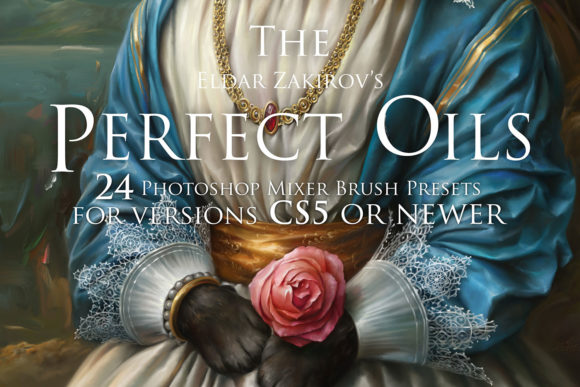
There's a certain magic in traditional oil painting—the way colors blend on the canvas, the texture of the brushstroke, the satisfying drag of thick paint. For digital artists, capturing that authentic feel has often meant settling for less. Brushes that feel synthetic, blending that looks muddy, and a final result that screams "digital" rather than "painted." This is the gap the Perfect Oils. 24 PHOTOSHOP Oil Brushes tool set was built to close. It’s not just another collection of brushes; it’s a carefully engineered set of Mixer Brush presets designed to replicate the tangible, responsive experience of working with real oils and acrylics directly within Adobe Photoshop.
What sets this collection apart is its foundation in real-world application. Every preset wasn't just created in a lab; it was built, tested, and refined through actual creative work. The result is a tool that feels less like a filter and more like an extension of your hand. The brushes respond to pressure and tilt, allowing for expressive, gestural marks or soft, blended passages. The core strength lies in the Mixer Brush functionality, which lets you paint and mix new colors directly into existing strokes on your canvas, just as you would with physical paint. This enables a life-like sketching and painting process, where happy accidents and nuanced color transitions happen naturally.
More Than Brushes: A Foundation for Your Artistic Voice
Think of the Perfect Oils set not as a quick effect, but as a foundational asset for building a unique painting style. The 24 presets offer a range of textures and behaviors—from stiff bristles for bold, textured strokes to soft hairs for smooth blending. This variety supports both expressive, abstract techniques and more controlled, realistic rendering. For a designer or illustrator, this means you can develop a signature look that is consistently yours. Whether you're crafting a moody editorial illustration, creating character art for a game, or painting a landscape for a book cover, these brushes help form a cohesive visual language that feels handcrafted and professional.
The practical applications are vast. For brand identity work, imagine creating custom hero images or logo marks that have the warmth and authenticity of a physical painting, setting a brand apart in a sea of vector graphics. In editorial design, they can add a layer of depth and artistry to magazine covers or feature illustrations. For packaging design, a hand-painted element can convey craft, quality, and a human touch. Even in digital spaces, using these brushes for social media graphics or web design hero sections can create immediate emotional engagement and visual hierarchy that static graphics struggle to achieve.
Integrating Authentic Texture into Your Workflow
Adopting a new design asset like this is about more than just installation; it's about integration into your creative process. The included PDF guide is crucial here, offering clear advice on setup and use. A key consideration is understanding how the Mixer Brush Tool interacts with your canvas. Setting up a separate layer for your painting, and perhaps using a textured canvas background layer, can dramatically enhance the realism of the strokes. The brushes are designed for Adobe Photoshop CS5 and newer, as they rely on the Mixer Brush Tool—a feature that transformed digital painting.
When evaluating if these premium brushes fit your project, consider the emotional tone you're aiming for. They excel where you need warmth, texture, and a sense of the human hand. They are less suited for ultra-clean, geometric designs but are perfect for adding organic contrast to such layouts. Test them by creating a small color study. Observe how the colors blend. Does the "liquid/soft paint sensation" feel right for your subject? This hands-on test is more valuable than any spec sheet.
For those concerned with font pairing in projects that incorporate these painted elements, the goal is harmony. A bold, modern sans serif font can provide a clean counterpoint to an organic painted background. A classic serif font might complement the traditional feel of an oil painting. The key is to let the painted texture be a dominant visual element and choose type that supports it without competing. This balance is essential for maintaining visual hierarchy and readability.
Practical Steps for Professional Results
To get the most from the Perfect Oils brushes, start with a mid-tone canvas rather than stark white. This mimics a toned ground in traditional painting and helps unify your color palette from the start. Use the brushes on a separate layer to preserve flexibility. Experiment with the "Wet" and "Mix" settings in the Brush Settings panel to control how much color is picked up and blended. This level of control is what moves you from simply applying a texture to genuinely painting.
Remember, the value of a creative font or tool is in how it serves the project. These brushes are a means to an end: communicating a specific feeling, telling a story, or adding a layer of sophistication. They can elevate a personal art project into a portfolio piece or give a commercial campaign the authentic edge it needs. The commercial licensing that comes with the set means you can confidently use your creations for client work, merchandise, and digital products, making it a sound investment for freelancers and small studios alike.
In a digital landscape crowded with perfect vectors and flawless renders, the deliberate imperfection of a painted stroke stands out. The Perfect Oils. 24 PHOTOSHOP Oil Brushes provide a reliable, tested pathway to that authenticity. They don't just mimic oil paint; they provide a responsive system for creating with it. For the designer, marketer, or creator looking to infuse their work with genuine artistic texture and depth, this tool set offers a practical, powerful solution that bridges the gap between digital convenience and traditional artistry.